![Qwiek_white.png]](https://help.qwiek.eu/hs-fs/hubfs/Presskit/Presskit%20Qwiek%20logo/Qwiek_white.png?height=40&name=Qwiek_white.png)
Activating the Sensuality Intervention modules
The Sensuality Intervention is an exclusive part of your subscription. Follow these three simple steps to turn the modules on and use them right away:
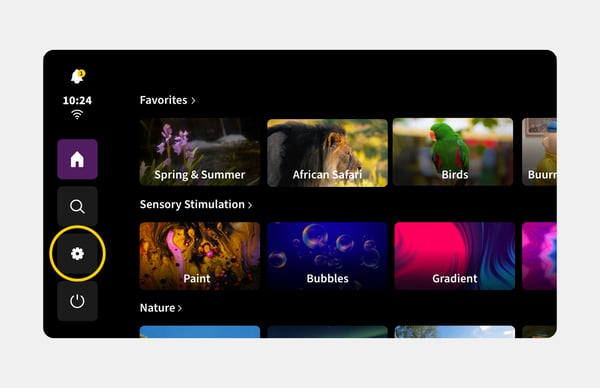
1. Go to settings
Go to the main menu of the Qwiek.up and tap Settings (gear icon).
2. Activate the Sensuality Intervention
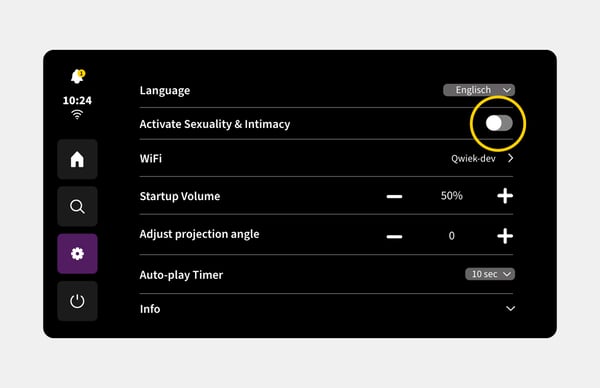
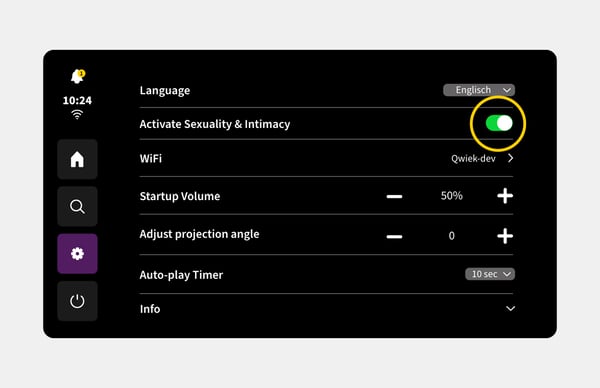
Look for the option 'Activate Sexuality and Intimacy' in the list and check the box.
3. Return to the main menu
Leave the settings and return to the home screen. The modules are now instantly visible and ready to use.
Deactivating the Sensuality Intervention modules
Simply follow the exact same steps and uncheck the box. After deactivation, the modules will immediately no longer be available in the main menu.