![Qwiek_white.png]](https://help.qwiek.eu/hs-fs/hubfs/Presskit/Presskit%20Qwiek%20logo/Qwiek_white.png?height=40&name=Qwiek_white.png)
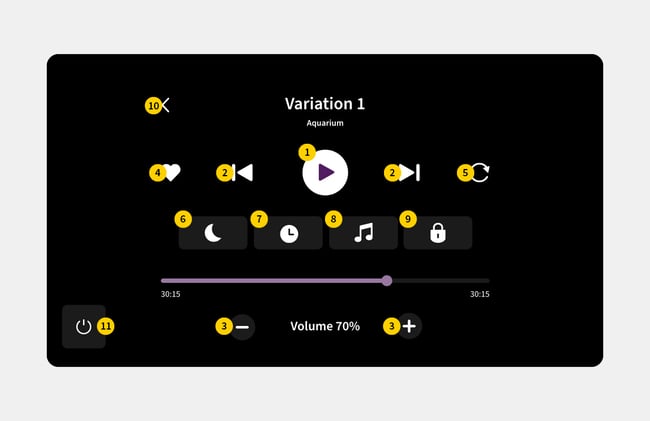
Overview of the control buttons
- Play / Pause
This allows you to start or pause the module at any moment. - Next / Previous
Use this to manually navigate to the next or previous variation within the module that is playing. - Volume
This allows you to directly adjust the volume level of the module, so that it perfectly matches the hearing and mood of the client. - Favorite
Save the active module as a favorite, so you can quickly find it in the main menu next time. - Repeat
This ensures that the current module or scene continues to play continuously. - Night mode
Dims the brightness of the projected image, ideal for a soothing atmosphere in a darkened room or at bedtime. - Timer
Set how long the module should continue to run. After the selected time, the projection automatically switches off. - Music
This allows you to adjust the background music or sound effects of the module. - Screen lock
Secure the screen against unwanted touches. - Back button
This takes you one step back in the menu to choose from the different variations of the module. - Power button
This allows you to turn the Qwiek.up itself on or completely off from the screen.