![Qwiek_white.png]](https://help.qwiek.eu/hs-fs/hubfs/Presskit/Presskit%20Qwiek%20logo/Qwiek_white.png?height=40&name=Qwiek_white.png)
1. On the housing (The physical product label)
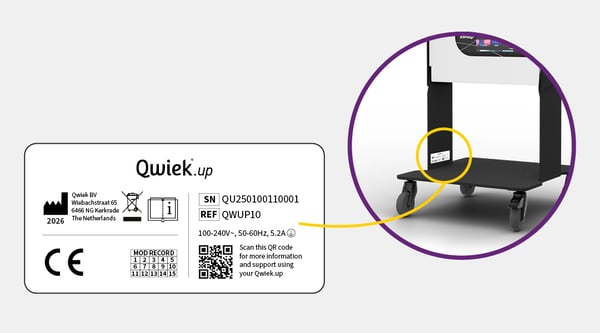
Is the screen unable to turn on, or do you not have the device plugged into the outlet? Then you can always find the serial number physically on the device itself.
- Check the sticker: Look at the official product sticker (silver-colored label).
- Location: This sticker is placed on the inside of the left leg (the frame).
- Identify the code: Look on the label for the text 'Serial Number' or 'SN'. The serial number starts with the code QU-.
See the image below for where to find the serial number:
2. Via the touchscreen
Just like with a tablet or smartphone, the serial number of the new Qwiek.up can also easily be looked up in the software.
- Open the settings: Tap the gear icon on the home screen.
- System information: Go to 'info' in the menu.
- Read the code: Here you will find the unique serial number, starting with the code QU-.